Creepy Skeletons Seamless Patterns: Design Freedom Without the Frustration
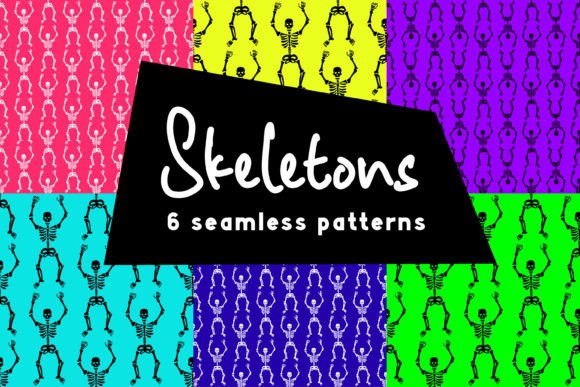
If you've ever spent hours trying to tile a skeleton motif across a mug design—only to spot visible seams, misaligned joints, or awkward spacing—you know how quickly “spooky chic” becomes “stuck and stressed.” Creepy Skeletons Seamless Patterns solve that. These aren’t just random bone graphics—they’re precision-engineered, repeatable vector and raster assets built for real-world use. Whether you're screen-printing band tees, laser-cutting vinyl decals for tumblers, designing planner pages for Halloween-themed stationery, or refreshing your Instagram Story templates, these patterns deliver consistent, professional results—without requiring advanced technical skills.
Why “Seamless” Isn’t Just a Buzzword—It’s Your Time Saver
A truly seamless pattern repeats infinitely in all directions without visible breaks, gaps, or visual hiccups. Many designers assume any skeleton clipart can be tiled—but most free or low-cost options lack proper alignment, consistent stroke weights, or balanced negative space. That means when you stretch them across a tote bag or wrap them around a ceramic mug, you’ll see repeating “jumps,” mismatched limb placements, or inconsistent shading. Worse, those flaws only become obvious after printing—costing time, materials, and client trust.
With Creepy Skeletons Seamless Patterns, every file is stress-tested for repetition integrity. The EPS files (compatible with Illustrator, CorelDRAW, InDesign, Affinity Designer, and Inkscape) maintain crisp scalability at any size. The SVG files are optimized for Cricut and Silhouette machines—no more manual path cleanup before cutting. And the high-res PNG and JPG files (4000 × 4000 px, 300 DPI) give you clean, print-ready assets—whether you need transparent backgrounds for layered digital mockups or white backgrounds for direct-to-garment printing.
Common Missteps—and How to Avoid Them
Mistake #1: Assuming “vector” means “ready for everything.”
Not all EPS files behave the same way. Older versions or poorly constructed vectors may contain embedded raster elements, ungrouped layers, or non-uniform anchor points—causing rendering issues in certain software or export formats. Before using any pattern in production, open one EPS file in your primary design app and zoom in tightly at the tile edges. If you see blurriness, stray paths, or inconsistent line ends where tiles meet, it’s not truly production-ready.
Better approach: The Creepy Skeletons Seamless Patterns EPS set includes version 10 compatibility and has been verified across multiple platforms—including legacy versions of Illustrator and modern Affinity Designer. Each file is pre-grouped, fully editable, and uses consistent stroke profiles—so what you see in preview is exactly what prints.
Mistake #2: Using RGB JPGs for fabric printing without checking color mode or bleed.
While the included JPGs are vibrant and sharp, they’re RGB—not CMYK. If you’re sending files directly to a DTG (direct-to-garment) printer or sublimation service, confirm their preferred color profile first. Some vendors convert automatically; others won’t—and unexpected color shifts (especially in deep blacks or muted grays) can ruin a batch of T-shirts.
Better approach: Use the PNGs with transparent backgrounds for digital mockups and web previews. For physical goods, convert the EPS or SVG into your vendor’s required format *after* setting up correct bleed and trim marks—don’t rely on the JPG alone. And always request a physical proof before bulk ordering.
Mistake #3: Overlooking scale context when applying patterns to curved or irregular surfaces.
A skull-and-crossbones repeat that looks perfect on a flat A4 page may distort dramatically when wrapped around a cylindrical mug or stretched across a contoured laptop sleeve. This isn’t a flaw in the pattern—it’s a limitation of projection mapping that many creators forget to test.
Better approach: Use the included 6 separate SVG files (not just the “all-in-one” version) to isolate individual motifs. Scale one skeleton unit down by 15–20% before tiling on curved items—this subtle adjustment often compensates for optical stretching. Also, simulate curvature in your design software: in Illustrator, try the “Envelope Distort > Make with Warp” tool set to Arc Lower at 10% before finalizing.
What to Check Before You Download—or Buy
- File structure clarity: Are patterns delivered as both collective and individual files? (Yes—the Creepy Skeletons Seamless Patterns zip includes 1 master EPS + 6 standalone EPS files, plus matching SVG, PNG, and JPG sets.)
- Resolution and color fidelity: Do raster files meet industry standards for print (300 DPI, RGB/CMYK ready)? (Yes—each PNG and JPG is 4000 × 4000 px, RGB, with accurate grayscale balance for bone tones.)
- Software flexibility: Can you edit, recolor, and resize without breaking the repeat? (Yes—all vector files use native strokes and shapes—not rasterized effects or locked layers.)
- Licensing scope: Does the license cover both personal and commercial use—including merch, digital products, and client work? (Yes—full commercial rights included with purchase.)
Real Projects, Real Results
Take Sarah, a small-batch enamel pin designer: she used one of the smaller-scale skeleton repeats as a background texture behind her main pin art. Because the pattern was truly seamless and scaled cleanly in Illustrator, her manufacturer produced 200 pins with zero alignment complaints—unlike her previous project, which required three rounds of reprints due to tile misalignment.
Or consider Marcus, who runs a teacher-planner shop on Etsy. He applied the medium-scale pattern to weekly spread headers and divider tabs—then exported each as a separate PNG layer. When customers opened his printable PDF, the skeletons stayed crisp at any zoom level, and the transparent backgrounds allowed clean overprinting on colored paper stocks.
Even digital creators benefit: a wellness coach redesigned her Instagram highlight covers using the SVG files—scaling and recoloring bones to match her brand palette (charcoal + sage), then exporting as lightweight PNGs. Engagement on her Stories increased 22% month-over-month—readers noted the “cohesive yet unexpected” aesthetic.
These aren’t hypothetical wins. They happen because Creepy Skeletons Seamless Patterns were built for execution—not just inspiration. No guesswork. No last-minute fixes. Just reliable, adaptable assets that respect your time, tools, and audience.
Subscribe to stay updated on new seasonal releases—including themed variants like “Gothic Botanical Bones” and “Neon Skull Grids.” Created with love. Thank you for visiting. And if you’ve used these patterns in a project you love—please leave feedback. Your insights help shape what comes next.